Scaling & Procfile
Define how your application runs and scale its processes independently using a Procfile.
The Procfile
A Procfile is a simple text file placed in the root of your repository. It tells Slasha which commands to run for different parts of your application.
# Example Procfile
web: npm run start
worker: npm run worker
release: npm run migrate
Process Types
Slasha recognizes three types of processes, each with a specific role:
1. web
This process handles HTTP traffic. Slasha automatically routes incoming requests to your web containers via the built-in Caddy reverse proxy.
2. worker
Use this for background tasks, such as processing queues or running cron jobs. Workers run continuously but do not receive HTTP traffic.
3. release
The release command runs once before a new deployment goes live. It’s perfect for database migrations or asset pre-processing.
Deployment Guard: If the release command fails (exits with a non-zero code), Slasha will abort the deployment and keep your current version running.
How to Scale
By default, Slasha runs one instance of each process type. You can scale your web and worker processes up or down at any time.
Using the Dashboard
The easiest way to scale is via the Scaling tab in the Slasha dashboard:
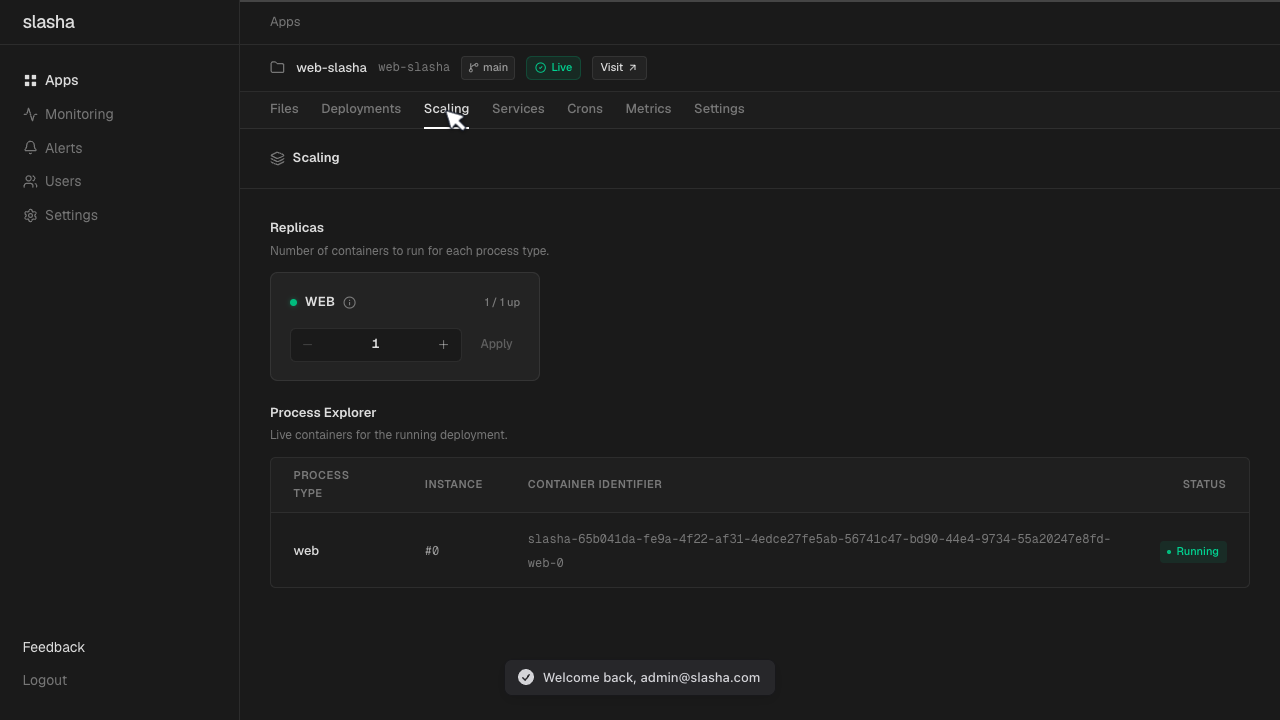
Using the CLI
Scale your app’s processes using the scale command:
# Run 3 web instances and 2 workers
slasha scale web=3 worker=2
When you scale, Slasha starts or stops the process containers in parallel, runs health checks against them, and updates the Caddy reverse proxy routing so traffic only reaches healthy web instances.
SQLite & Scaling: If you use SQLite with Litestream backups, you are limited to 1 web instance to prevent database corruption.
Reliability
Slasha uses Docker’s unless-stopped policy for all processes. If a container crashes, Docker will automatically restart it. If your server reboots, Slasha will bring all your apps and services back online automatically.