Backups (Litestream)
Protect your SQLite databases with automated, continuous replication to S3-compatible storage using Litestream.
How it works
Litestream runs alongside your application and streams your SQLite changes (WAL logs) to the cloud in real-time. If your server fails, you can recover your database with almost zero data loss.
Configuration
You can enable backups for any app through the web dashboard. You’ll need to provide your S3 credentials and bucket details:
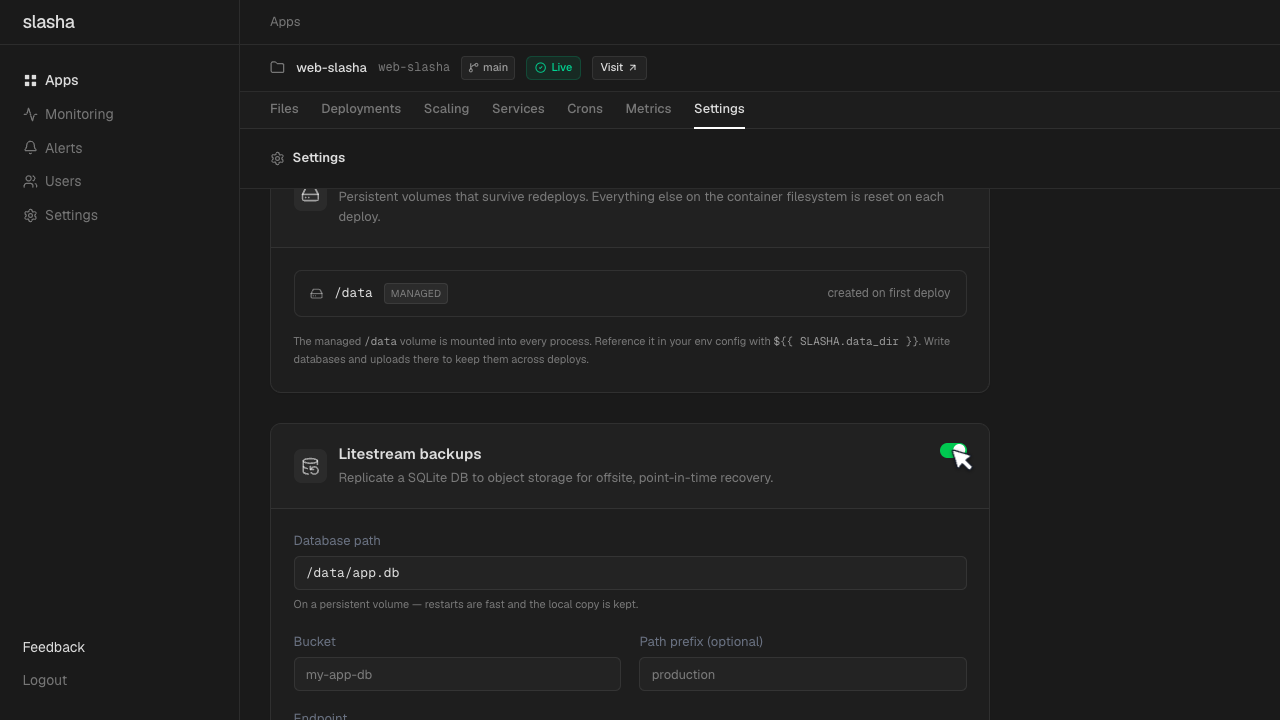
- Database Path: The absolute path to your
.sqlitefile inside the container (e.g.,/data/db.sqlite). - S3 Bucket: The name of your backup bucket.
- Endpoint: Your S3 provider’s endpoint (e.g., AWS, Cloudflare R2, or DigitalOcean Spaces).
- Credentials: Your S3 Access Key and Secret Key.
Automated Recovery
Restoring your data is automatic. When your app starts up (e.g., after a server reboot or a new deployment), Slasha checks if the database file exists.
If the file is missing, Slasha automatically downloads the latest backup from S3 before your app boots. This ensures your application always starts with the most recent data.
Scaling Limitations
Important: Because SQLite only allows one writer at a time, apps with Litestream enabled are locked to 1 instance. You cannot scale an app with backups enabled beyond a single process.
Monitoring Backup Health
You can track the status of your backups directly in the Slasha dashboard. We show you:
- Last Synced: The last time a change was successfully uploaded.
- Status: Whether the replication is healthy or if there’s an error (like expired credentials).